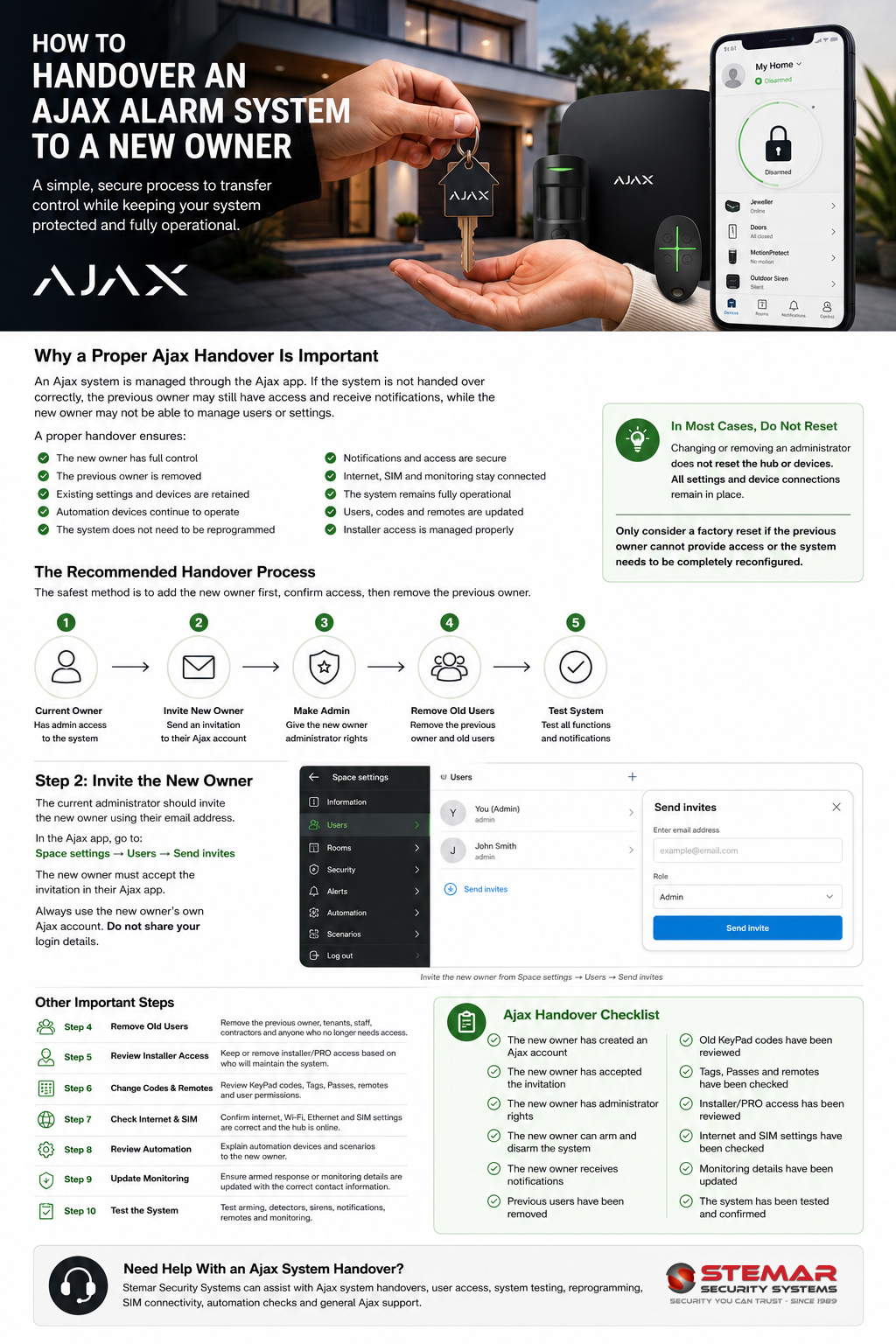
How to Handover an Ajax Alarm System to a New Owner
When selling, renting out, or handing over a property with an existing Ajax alarm system, it is important to transfer control correctly. A proper handover keeps the system operational, protects the previous owner’s privacy, and ensures the new owner has full control of the alarm, users, notifications, and settings.
The best approach is usually not to factory reset the system. In most cases, the existing Ajax hub, detectors, sirens, remotes, relays, automation devices, and settings can remain in place. The new owner simply needs to be added as an administrator, after which the previous owner and any users who no longer require access can be removed.
Why a Proper Ajax Handover Matters
An Ajax system is linked to user accounts through the Ajax app. These users may be able to arm and disarm the alarm, receive alarm notifications, view system events, control automation devices, and in some cases change system settings.
If the system is handed over incorrectly, the new owner may not have full access, or the previous owner may still receive notifications or retain control. This can create security, privacy, and practical issues.
A correct handover ensures that:
- The new owner has full administrator access.
- The previous owner no longer has access once handover is complete.
- Existing devices and settings are retained.
- The system does not need to be reprogrammed from scratch.
- Automation devices such as gate alarms, geysers, lights, pool pumps, or relays continue to work.
- The new owner can update internet, SIM, notification, and user settings.
Recommended Handover Method
The recommended method is to transfer access while the system is still working and while the current owner still has admin rights.
Step 1: Ask the New Owner to Create an Ajax Account
The new owner should download the Ajax app and create their own Ajax account using their own email address and mobile number.
They should also enable two-factor authentication for improved account security.
The previous owner should never give their own Ajax login details to the new owner. Each person should use their own Ajax account.
Step 2: Add the New Owner as a User
The current admin should open the Ajax app and invite the new owner to the system.
In the Ajax app, go to:
Space settings → Users → Send invites
Enter the new owner’s email address and send the invitation.
The new owner must accept the invitation in their Ajax app.
Step 3: Give the New Owner Administrator Rights
Once the new owner has accepted the invite, the current admin should give them the correct permissions.
For a full property handover, the new owner should normally be made an administrator with rights to configure the system. This allows them to manage users, notifications, devices, rooms, groups, security settings, and installer access.
Before proceeding further, confirm that the new owner can:
- Open the Ajax app.
- See the correct property or space.
- Arm and disarm the system.
- Receive notifications.
- Access the hub and device settings.
- View and manage users.
Step 4: Remove the Previous Owner and Old Users
Only remove the previous owner after the new owner has confirmed that they have full control.
Once confirmed, the new owner or current admin should remove users who no longer require access. This may include:
- The previous owner.
- Family members of the previous owner.
- Tenants who have moved out.
- Old staff members.
- Previous installers who no longer manage the system.
- Previous security company users, if no longer required.
This step is important because anyone left on the system may still receive notifications or control the alarm, depending on their permissions.
Step 5: Review Installer or PRO Access
If the system is maintained by an installer or security company, the new owner should decide whether that company must remain connected to the system.
If the same installer will continue supporting the system, their PRO access can remain. If the new owner wants to appoint a different installer, the old installer’s access should be removed and the new installer can be invited.
For security, installer access should only be granted to trusted companies or technicians.
Step 6: Update User Codes, KeyPads, Tags, and Remotes
The new owner should review all ways the system can be armed and disarmed.
This may include:
- Ajax app users.
- KeyPad codes.
- Duress codes.
- Tag or Pass devices.
- SpaceControl remotes.
- Button devices.
- Automation scenarios linked to arming and disarming.
Any codes or devices used by the previous owner should be changed, disabled, or removed.
If the property has staff, tenants, domestic workers, gardeners, or contractors, the new owner should create new access permissions instead of reusing the previous owner’s setup.
Step 7: Check Internet, SIM, and Communication Settings
The Ajax hub needs a reliable connection to Ajax Cloud. Depending on the hub model, this may be through Ethernet, Wi-Fi, SIM card, or a combination of these.
During handover, check:
- Is the hub connected to the new owner’s router or internet service?
- Is the SIM card staying with the property?
- Who is responsible for the SIM card account or data package?
- Is the SIM card active and loaded with data?
- Is the APN correct?
- Are Ethernet and Wi-Fi settings correct?
- Does the hub show as online in the Ajax app?
If the previous owner’s internet service will be cancelled, the hub should be connected to the new owner’s internet as soon as possible. If a SIM card is installed, it may keep the system online temporarily, provided it is active and has data.
Step 8: Review Alarm Monitoring or Armed Response
If the Ajax system is connected to an armed response company or monitoring station, this must be updated separately.
The previous owner should not leave an active monitoring agreement in their name unless specifically arranged. The new owner should contact the monitoring or armed response company to open or transfer the account.
Important details to confirm include:
- Who receives alarm signals?
- Whose name is on the monitoring account?
- Which phone numbers are called during an alarm?
- What address and access instructions are listed?
- Who is responsible for monthly monitoring fees?
- Are panic alerts monitored?
If monitoring is not updated, alarms may still be linked to the previous owner’s details.
Step 9: Test the System After Handover
Once the new owner has admin access and old users have been removed, the system should be tested.
Recommended checks include:
- Arm and disarm from the Ajax app.
- Test entry and exit delay.
- Test keypads, remotes, Tags, or Pass devices.
- Trigger selected detectors in test mode.
- Check sirens.
- Confirm push notifications are received.
- Check SMS or call alerts if enabled.
- Confirm hub online status.
- Check SIM backup, where applicable.
- Test automation devices such as relays, WallSwitches, LightSwitches, or gate alarm triggers.
If the system is monitored by a security company, place the account on test before triggering alarms.
Should the Ajax Hub Be Factory Reset?
A factory reset is usually not recommended for a normal property handover because it may require the system to be reconfigured from scratch.
A reset may be considered if:
- The previous owner cannot provide access.
- The system configuration is unknown or unreliable.
- The new owner wants a completely fresh setup.
- There are privacy or security concerns.
- The system has been abandoned or incorrectly configured.
However, a reset should only be done by someone who understands Ajax programming, as devices, rooms, groups, scenarios, delays, sirens, automation, and user settings may need to be configured again.
For most handovers, adding the new owner as an admin and then removing the old users is the safer and faster option.
Handover Checklist
Before the previous owner leaves the property, confirm the following:
- The new owner has created an Ajax account.
- The new owner has accepted the Ajax invitation.
- The new owner has administrator rights.
- The new owner can arm and disarm the system.
- The new owner receives notifications.
- Previous users have been removed.
- Old keypad codes and remotes have been reviewed.
- Installer or PRO access has been reviewed.
- Internet and SIM connections have been checked.
- Monitoring or armed response details have been updated.
- Automation devices and scenarios have been explained.
- The system has been tested.
Need Help With an Ajax Handover?
Stemar Security Systems can assist with Ajax system handovers, user access, system testing, reprogramming, SIM connectivity, and general Ajax support.
Whether you are selling a property, moving into a new home, taking over an existing alarm, or changing users on an Ajax system, we can help ensure the system is handed over safely and correctly.
Download the Ajax Handover Guide
Need a simple one-page version of this guide? Download our Ajax System Handover Guide to keep as a checklist when transferring an Ajax alarm system to a new owner.